Articles by "beginners"

Showing posts with label beginners. Show all posts


1. What is blogging?
Blogging is the online version of a newspaper basically. You may already be reading blogs and you were unaware of the term. Many people asking this question are probably in their 50′s and older.
These individuals read articles on the homepages of MSN, Yahoo, and other sites on a pretty regular basis. Yahoo is a search engine, but the home page has a blog functionality to it.
Many writers, or bloggers, are contributing to those articles on those homepages. The internet is filled with millions and millions of blogs and bloggers. You can find a blog on pretty much any topic out there. Some bloggers blog daily, while others blog multiple times a day, and others update whenever they feel like it.
2. How does blogging work?
Blogging is based off the same principle that newspapers, magazines, and even TV shows work. Each of those are filled with content that they think people will like.
To start a blog, you’ll need a platform. There are a variety of platforms out there. Some are free, while others have a cost associated with using it. If you’re just starting out, I would recommend the following blogging platforms to you:
  • Blogger
  • WordPress.com
if you want to take your blog more seriously and be in it for the long haul, then there’s some better options available to you. First, let me educate you on the process of making your own blog.
Most bloggers who take this route use the platform, WordPress.org. (Not to be confused with the free WordPress.com) They need to purchase a domain name and host that domain. A popular domain registrar is GoDaddy.com. 
A domain name is the web address you type to visit the website. For example: Facebook.com and Twitter.com are both domains. Hosting is like electricity and this is what keeps the site up and live on the Internet.
(Note: both domains and hosting expire. If they expire and you don’t renew, then you lose your website.)

Marsha Collier's Social Media Commerce Toolkit


For each arm of your social media commerce strategy, you use a different marketing tool. Here's a shortlist of platforms to build your online conversation, which should ultimately lead to new customers through your engagement. Check them out and see which best fits your social persona. Soon you'll have a clear social media plan for your company.

Basic content outreach

  • Facebook: Reach all ages with the largest social network
  • Twitter:Converse on this widely adopted messaging service via 140-character tweets
  • LinkedIn: Connect with like-minded professionals on this top business social networking site.
  • Google+: Reach newer adopters and techies on Google's social network

Free blogging platforms

  • Blogger: Google-owned blogging suite with free hosting and theme personalization
  • Posterous: Twitter-owned free blogging platform with themes
  • Wordpress: Free blog hosting managed by the developers of WordPress software

Linking

  • Bitly: Shorten URLs for posts; offers analytics and supports customization
  • Visibli: Attach a social engagement bar to all your shared links, with analytics
  • Pinterest: Share images on your own virtual pinboard on this popular scrapbook site

Images and videos

  • Flickr: Find royalty-free images to use on your blog; store and share your own
  • YouTube: Post videos for linking on your blog, Facebook page, and other social platforms

Podcasting

  • blogtalkradio: Podcast live and record using your telephone line
  • Spreaker: Create live or prerecorded podcasts with a microphone from an online or a mobile console
  • wsRadio: Conduct professional, radio-station-style podcasts

F-commerce

  • Fanpage Toolkit: Build your Facebook marketing with their five core application modules (Page Builder, Promotions, F-commerce, Messaging, and Analytics)
  • eBay Items: Port eBay listings to a Facebook business page; when item is clicked from Facebook Store App, customer is directed to the eBay listing
  • Ecwid: Install a full-featured shopping cart on your website or Facebook page with this app

Reviews

  • Yelp: Stay on top of customer reviews and offer discounts on your page
  • Angie's List: Claim your listing on this important review site for any service or Main Street business
  • Foursquare: Promote customer mobile check-ins with loyalty bonuses


No matter whether you are a photography blogger or not, promoting your photos or content at instagram could certainly improve your traffic as well as your followers. Considering that instagram have millions of users across key countries like USA, Canada and other European states. If you are looking to add an interactive instagram photo gallery widget to your blogger site, then you have reached to the right place. Today in this article, we will show you, how to add instagram photo gallery widget in blogger.

By default, instagram doesn’t have any official widget that could help us in this cause. However, there is a third-party widget that works really well. To get started, go tohttp://snapwidget.com/#getstarted and create an instagram widget for your site according to your desire needs. We have attached a screenshot below to help you understand its interface.


After modifying the widget rendering to your requirements, press the “Get widget” button. On pressing the button you will be provided with your HTML embed code for the gadget.


Now go to Blogger.com >> Add a new Post >> and in the Edit HTML tab paste the widget code, which you copied a few steps a go. Once everything is completed, publish your post to see the widget in live action.

We hope this small tutorial may have helped you in adding a way better instagram widget to your blogger site. If you have any way to do the same job even better and lot quicker than feel free to mention it in the comments below. 

By using proper images in blog post will not only make your post designable but also attracted more and more visitors. Adding proper dimension images in blog posts is a prominent job & also very very essential for SEO. Such images give an illustrative mapping help to readers. So what if we have used & added a random dimension images in earlier post and now we want to resize all of them at once. Is it possible to decrease or increase image size in all posts automatically. Since from the couples of days we received bundles of email asking for helps is there any way to resize all previous posts images instantly. Yes surely we could easily customize all these photos by playing with a little Css Code. So in this article we will show you how to resize all post images automatically in blogger blog.

Learn How To Resize All Images Automatically In BloggerThis is a very simple trick. You could easily customize this by following simple steps.
  • Go to blogger Dashboard: 
  • Go to Template/ Edit Html:
  • Now Search for  ]]></b:skin> tag 
  • Now past the below given code just above the ]]></b:skin> tag

.post-body img {
width: 500px!important;
height: auto!important; }


Possible Customization

  • If you want to increase or decrease the width of image then change the value of width: 500px:
  • If you want to increase or decrease the height of image then give value to height:500:px or according your blog width:
  • If you wish to add border to the image then simple add this property to the above coding border: 1px solid #d2d2d2  
  • Save your template >> You done Almost:

Google+ has been a new stage these days for getting popular and sharing your stuff to the world. If you are a blogger, then you must be fully aware of Google+ and would know the need to get enough audience that makes your post popular, enough popular that you feel your hard work has paid off.

Google has provided all the bloggers with a function that could simply do the job for them of putting up their blog posts on their google+ profile without any manual sharing that is usually needed to be done on other Social websites like Facebook and Twitter. You just do the settings once and then each and every post of yours will be there on your profile, easily accessible to everyone in your circle.

In this tutorial, we’ll guide you throughout the process of linking up your blogger with your google+ account so that your post gets up there and entertains more visitors for you.


Note: Some of you might have already linked your bloggers with your Google+ profile, so those who already have, why don’t you look for some other modifications that you could do to your blogger as you are good to go with this one?

Publish Your Posts Automatically To Google+

Step#1: Have a Google+ profile. Most of the bloggers must have that one, but if you don’t, you can easily get one. It is easy, you just have to make use of your google account and visit https://plus.google.com. You’ll be then directed to your Google+ profile.

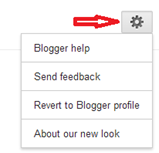
Step#2: Login to blogger and reach the dashboard. On the top right of the screen, you’ll see a gear icon, click on that. You’ll see “Connect to Google+”, if you aren’t already connected. My gear icon also doesn’t display “Connect to Google+” as it is already linked.

Step#3: That’s it, you’re done. Your profile is now linked with your Google+ profile.

Features:

  • It automatically syncs all the data from your blogger profile and updates your Google+ profile, so if you have just made your Google+ account and it has got nothing, then don’t you worry, Google will do it for you and your profile will be ready with the details you have provided in your Blogger.
  • Once you are linked, you should know that your Blogger profile can be left inactive and all of your users and visitors will be directed to your Google+ profile.
  • Whatever post you put up on your Blogger will be there on Google+ too.
  • If you had already been a Google+ member, then upon linking your blogger with it makes it possible to increase your traffic due to the visibility of your content to everyone who is in your Google+ circle.
  • What you should KNOW is that you will have an option of reverting your account back to your blogger profile if in case you are unhappy within 30 days, if you are happy with Google+ then you should also know that after 30 days your blogger profile will be deleted. SO you’ll have then only Google+ profile that’ll be the central hub for all your blogs just like your blogger used to be.
  • If you have made changes to your blogger’s commenting scheme and have adapted Google Plus commenting system then upon linking the two profiles, any comment made on the shared post on Google+ will also be synced to the blog post.
So, this is something that I think every blogger must try as it provides greater opportunities to grow and develop. And it looks cool too.


Today my post is about disabling image Lightbox in blogger blogs and if you are wondering what is this lightbox. Here is an answer for you when we click on post images on our blogger blogs we see images pop out and the page behind fades out in light black color. Lightbox is enabled by default in all blogger blogs, however some bloggers don’t feel like having this lightbox for them I am writing this article. In this article I will show you how to turn off image lightbox in blogger blogs.


How To Turn Off  Image Lightbox In Blogger Blogs


Login to your blogger blog and select your blog from the list of blogs.

Once you have picked your blog, click on Settings >> Posts and Comments. See below image to get a clear idea.


Now see under the heading of posts, there is a label "open images in the Lightbox" which isYes by default select No from the drop down and click on save settings button to complete the process. See below pictorial representation.
Congratulations, you have successfully turned off a  image lighbox from your blog. Now go and experiment it with your blog.do expresses yourself about this article in comment section and we will be happy to reply you.

SEO abbreviation of search engine optimization plays a critical role in driving traffic to your blogs or site that's why most of the bloggers and webmasters always try to improve SEO

 of their blogs. Optimizing images before uploading them to blogger blog can also play an important role in improving the SEO of your blog and most of the bloggers do not pay attention towards optimizing images. We as bloggers when download images they are saved as irrelevant names such as untitile.png, do you know that the Google image search is the widely used image search engine users always use it for finding quality images, icons and photos. You can drive a large no of audience to your blog by optimizing images and we are here to serve you. In this article we will describe you how to increase blog traffic by optimizing images.

How To Increase Blog Traffic By Optimizing Images


Give relevant name to the image 

First, you need to realize that image which you are downloading needed to be given a particular name. By particular name I mean the name which has some relation with your post. For example, if you are writing an article on adding a Facebook like box to blogger the image you upload to this article must be named like Facebook Like Box.png so that it relates to the content.

Add title and atl attribute


Search engines can read images they depend on tags and title given to images. Therefore, to tell search robots about the image we should add title and alt attribute to image. In blogger once image is added to post click on image and select properties. A pop box will open you can put image title in the title text box which should be relevant to your content and in alt text box give a small 4 to 5 word description of the image.

I presume you will adapt these tips of optimizing images, if you do there is a definite chance of increasing your blog traffic.

Liz Borod Wright, a freelance writer based in New York City, runs the popular travel blog, Travelogged. She is also a social media consultant and an adjunct for social media at Columbia Journalism School’s continuing education program.

When it comes to building an audience and driving traffic, bloggers are turning to social media with record results. Instead of relying on organic search or (gasp) IRL friends, successful bloggers know they have to develop a following on key social networks as a way to promote their brands and ultimately get more clicks.
Twitter, Facebook, StumbleUpon and now Pinterest provide the savvy blogger with plenty of opportunities to attract new readers and engage with regulars, but it can be overwhelming if you’re new to social media or if you only use it for fun.
Here are 10 tips to help bloggers navigate the increasingly complex world of social media — while still making time to write content.

1. Display your social media icons prominently toward the top of your website.

Make it as simple as possible for your blog readers to connect with you on various social media platforms. They shouldn’t have to hunt around to find your Twitter handle, but should be able to click on a button and be taken right to your profile. Bonus points if your social media icons reflect the overall design or feel of your blog.

2. Every blog should have its own Facebook Page.

Even with Facebook’s new subscription feature, there’s still merit to giving your blog its own space on Facebook. It’s nice to be able to post a link every time you publish something new, and not have to worry about annoying your friends. Plus, readers who don’t your name but know the name of your blog can search for it on Facebook. Show your fans some love on your blog by using the Facebook social plugin, which makes it easy to convert readers to fans.

3. Generate traffic with StumbleUpon.

This “recommendation engine” serves as an alternate browser where users click through pages that their SU friends and SU itself have recommended. You can submit your own blog posts into the system, but it works best if you also share them with your SU friends and accept their shares back. Like most social platforms, you need to have a strong following to get good results. While people are still trying to figure out what makes SU content go viral, many bloggers have seen terrific, albeit fleeting, traffic spikes through the service.

4. Import your RSS feed onto your LinkedIn profile using its Blog Link application.

As long as your blog somewhat pertains to your professional goals, you should be showcasing it on LinkedIn. List it as one of your three websites in your profile, where it will be labeled “Blog.” However, by using the Blog Link application, your most recent posts will display right on your profile.

5. Pinterest is the hot new frontier for bloggers.

Pinterest is the cool new kid, and all of the bloggers are scrambling to establish a presence there. Pin your best photos onto themed boards with links to a relevant blog post. Blogs with strong visual content, like fashion, food, design, crafts and travel, are a natural fit. Infographics will also do quite well. Don’t forget to add a Pinterest plugin (like the Pinterest "Pin It" Button for WordPress users) to make it easy for your readers to share your content on their Pinterest boards.

6. Use link shorteners even when you don’t have to.

Twitter will now shorten your link for you, and the length of your link doesn’t matter on Facebook and Google+. But by using a link shortener like bit.ly, you will gain access to metrics, so you'll know how many people clicked and at what time. With this essential data, you can experiment with different ways to tease your content and different times to post it.

7. Use your blog name as your username whenever possible.

Promote your personal brand by consistently using your blog’s name for your Twitter handle, StumbleUpon name, Pinterest name and so on. Then, people don’t have to wonder about your blog’s name — it’s right there. Also, people will remember you easily across platforms, which is key as you develop up your online community.

8. Join blogger groups on Facebook.

There are some very active groups on Facebook that are terrific resources for any blogging issues you encounter. Look for groups like “Travel Bloggers” or “Global Bloggers Network.” WordPress geeks have “Advanced WordPress” and Central Florida residents have “Central Florida Bloggers.” Not only are blogger groups good for problem-solving, but it’s well-known that bloggers like to read other blogs. Do some searching and find a bloggers group that’s suited to you, or start your own!

9. Be generous with other bloggers.

Promote other bloggers' content, and hopefully they’ll return the favor. You can’t simply blast your own content anyway — you need some variety in every social media stream. So why not check out what your fellow bloggers are posting and give them a retweet, a share or a repin whenever you can. And don’t forget to reciprocate and share content from bloggers who share yours.

10. Be on social media — even when it's not driving traffic.

It can be frustrating when you feel that you’re doing everything right (posting good content on the appropriate platforms in the best way possible) and you’re still not getting many clicks. But console yourself by thinking about all of the links that you see throughout the day that you don’t click on. Just spending time on social media platforms is great way to forge relationships, keep up on industry news and find inspiration for that next blog post.

  Before i get started let me tell you a little about blogging which is nowadays contributing a lot in the internet market. Blogging is not a site to copy & paste material but it is an online personal diary, where whatever you share like your own personal thoughts or views not just remain to your online diary but being shared with the whole world.For any professional it is now becoming a necessary tool.Most important is that It not only provide a greatest potential for self-employment but also make it possible to earn online money for sure through google adsense.

I know that you people are now really thinking the same as the title said"Why Should I Start Blogging?" Even i thought the same three weeks before but a little different as "Why should I restart blogging?".Believe me or not that was really disturbing & irritating.

First I search that why people love blogging & why the list of bloggers increasing day by day? According to my research i found many different reasons, for example:

  • blogging let them share their personal thoughts with the target audience sitting anywhere around the web.
  • engaging target audience in the blog increases long lasting realtionship or buil network which is very important even for a common man.
    As said by Teacher Sir Naveed Ahmed Siddique" Networking is the currency of today's economy"
  • With the help of blogging specially online business can create backlinks, drive traffic & can build trust among their customers.
  • For a website & even for a common person it can increase website ranking on search engine.
  • With relevant & informative blog posting as well as commenting will contribute towards increasing value of the blog & obviously more traffic flow creating loyal followership..
  • The most important & interesting reason was earning money with blogging by activating google adsense.
there are may reasons other than above, but what i found interesting & important i shared it with you, if you have some other reasons, do share them please, i will love to know them :)

Instead of the above logical reasons still people quit blogging (including me as well ) . Again some of the reasons what i came to know for this quitting are:

  • bloggers thinking that There's too much competition in the internet market, for a new blogger there's no way they can compete & be successful with so many bloggers who already made a reputable position in the internet market.
  • bloggers thinking that they have run out of thoughts or having no writing material to share.
  •  thniking that it is a time consuming process & taking too long to see the desired success so they stop working.
  • it requires more dedication in sense of hard work & time than thought before & they find themselves with shortage of time.
  • bloggers having unrealistic expectations of blogging being an easy & quick task usually quit it in the start .
  • the most common reason of quiting is the disapproval of google adsense through which bloggers earn money( one of the main reason why i first quit blogging almost one year before).
If you are familiar with the last reason for the bloggers to quit you will start thinking that why google adsense was disapproved? after this failure (disapprovement of google adsense) i realised that it was not a failure but a lesson which i learned by that mistake. the main reason of this disapproval was not having patience vision, incorrect timing for applying to google adsense & abnormal clicking of friends on my adsense etc etc.
the lesson what i learned was everything will run best if it will be done at the right time & in order to apply for the adsense you should wait at least for a year when you will have 10,000-15,000 traffic per month.

Still Why Even You Should Also Start Blogging?
Well,I know that the question in the title & in your mind is still there, but if you remembered that in the start i asked a question that why the list of bloggers increasing day by day?Did you think of it?
the list is increasing because those bloggers realised that after two years when it is a must to have a personal blog with a reputable position in the market ,there will be more competition from now that you cant even imagine and that time having 10,000-15,000 traffic per month will only be possible for old bloggers or for those having really unique ideas & willing to do hard work with lot of patience etc.

 My Teacher Sir Naveed Ahmed Siddique said "Always Be Passionate About What & how to give back to the community & about your goals not about how to make money. no doubt you have to think about it as way to achieve your goal & to have financial freedom".

So, if you think about what recently majority of the bloggers start to realize as mentioned above & if you search by yourself you will find that there is a real n vast oppurtunity for new bloggers even now. the most important point is that blogging will give you long term benefits which you will usually realize after two years and the same a secure source to earn online money along with your work with zero start up cost as compared to traditional business. (with blogging you can start & fail & can try again even for the money comapred to the past) along with that you can find variety of experts & coaches & other bloggers who can guide you & with whom you can also build your network like me.. O:) who really do want to see you succeed and help you get there.

NOW IT’S YOUR TURN:
hope so that you will find it usefull & will start think to start blogging as well,
increase your ranking in search engine, build long term networking, let people know what you think, earn money as well and much more.

Best of luck & do share your comments and new blog as well to motivate others along with that to get backlinks & to increase traffic on your blog.

If you dont know how to start blogging or what to do in that ,then you must wait for my next post..

Thanks for giving me your precious time :)


The digital age has presented additional business opportunities to increase awareness of your products/service in a cost-effective way. Blogging is a tool that some companies don’t utilize, often due to the lack of knowledge behind the impact a blog can make for their company. Here are five reasons for your company to blog.
  • Search engine optimization (SEO) is seen as arguably the top reason for companies to publish a blog. When you search a term on Google, the most relevant sites appear at the top. Most people, when searching keywords, do not have a specific company or webpage in mind (otherwise they would simply bypass the search engine). The best practice to get to the top of a Google search lies in SEO. Blogs are a tool for good SEO because they give your website more “meat” to grab on to. The more keywords that your site has related to the target keywords you want to show up for, the more likely you will appear higher in search engines (i.e. if you sell garage doors, the more words on the website that discuss garage doors the more likely you are to show up in search engines).
  • Expert Advice. You need to prove to your audience that you are an expert, if you aren’t considered an expert why would someone do business with you? They wouldn’t! Putting your expert advice on the internet for your customers and potential customers to see can lead to (more) trust. Blogs help companies gain loyalty from customers by communicating in a personal tone.
  • It’s easy and “free!” If the first two points aren’t enough to start a blog, the third point should put you over the edge. Blogging is free….generally. Upon your discretion you can purchase domain names for your blog, or you may have to pay more through who manages your website. Trust me; the impacts of a blog will outweigh the minimal price time and time again. Once you get a blog set up, you can post anything – videos, pictures, writing, links etc. Blogging is not meant to be hard, that’s why there’s a blog to cover virtually every topic.
  • Cross promotion. A blog can help promote your website, or other social media sites. The internet truly is a “web” of topics that is waiting to get tapped into.
  • Buzz. Have something innovative that will change your industry as we know it? Apple is a company that uses this tactic very well. Most companies would send out press releases to promote a product. Not Apple; instead the company spreads their buzz via blogs – at least blogs happen to hear about their product launches. Apple successfully doubles up their coverage when most companies would unveil the product at the launch; Apple chooses to release small details along the way increasing suspense.

Bottom line, if your company doesn’t blog, then they are in the minority! Amazing, right!? If your company isn’t blogging, what are you waiting for? Get started! Set a goal of sending one solid post a month, and try to increase the amount of posts once you get comfortable.

Is your company blogging? What impact does the blog have for your company?

Author Name

{picture#https://plus.google.com/u/0/+MahamShahidFarooq/about?pid=6074188247542010530&oid=101689194546144986205} {facebook#https://www.facebook.com/MahamShahid7865} {twitter#https://twitter.com/Mahamshahid7865} {google#https://plus.google.com/+MahamShahidFarooq/posts} {pinterest#https://www.pinterest.com/mahamshahid7865/} {Instagram#https://instagram.com/mahamshahid7865/}

Contact Form

Name

Email *

Message *

Powered by Blogger.